> For the complete documentation index, see [llms.txt](https://doc.orbeon.com/llms.txt). Markdown versions of documentation pages are available by appending `.md` to page URLs; this page is available as [Markdown](https://doc.orbeon.com/form-runner/component/timestamp.md).
# Timestamp
## Availability
[\[SINCE Orbeon Forms 2025.1.1\]](/release-notes/orbeon-forms-2025.1.1.md)
## What it does
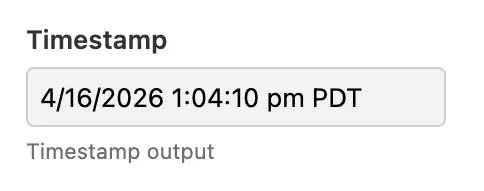
The timestamp component is a readonly form control able to show an instant in time, with date, time, and timezone. It does not support user input: instead, it is meant to show a value, for example the last modified date of a form.
Timestamp component
## Usage
From Form Builder, insert the Timezone control from the toolbox.
## Datatype
`fr:timestamp` must be bound to the `xs:dateTime` type.
In addition, it expects a value with a timezone offset or the suffix `Z` for UTC. For example these are valid values:
* `2024-06-30T12:34:56Z`
* `2024-06-30T12:34:56+02:00`
The following is not a valid value, because it doesn't have a timezone offset and represents a *local time*:
* `2024-06-30T12:34:56`
In particular the following functions return a value with a timezone offset:
* `current-dateTime()`
* [fr:modified-dateTime()](/xforms/xpath/extension-functions/extension-form-runner.md#frmodified-datetime)
* [fr:created-dateTime()](/xforms/xpath/extension-functions/extension-form-runner.md#frcreated-datetime)
In particular, these can be used with:
* [Formulas](/form-builder/formulas.md): see the "Initial" or "Calculated Value" formulas
* [Action syntax](/form-builder/advanced/services-and-actions/actions-syntax.md): see the `` action
* [simple process](/form-runner/advanced/buttons-and-processes/actions-form-runner/actions-form-runner-control-setvalue.md): see the `control-setvalue()` action
*NOTE: While the timezone offset in the value can have meaning, its main function is to refer to an absolute point in time (or instant). That timezone offset is not used for formatting the value to the user, see below.*
## Timezone
### Client-side
When displaying a timestamp, the value is converted to the current user's local timezone as provided by the web browser.
### Server-side
When rendering on the server, for example when producing a PDF file, the value is converted to a timezone provided on the server, as follows:
* `user.timezone` property, if set, for example to `Europe/Paris`
* `oxf.fr.default-timezone` property, if set
* UTC timezone, if none of the above is set
## Configuration
### Date format
The format by default is done with the following property:
```xml
```
The above includes:
* a date format (see the [Date](/form-runner/component/date.md) control)
* a separator string (here a space)
* a time format (see the [Time](/form-runner/component/time.md) control)
* a timezone format
The timezone formats are the following:
| Symbol | Meaning |
| ------ | --------------------------------------- |
| `[Z]` | Short offset, for example `+02:00` |
| `[z]` | Long offset, for example `GMT+02:00` |
| `[ZN]` | Timezone short name, for example `CEST` |
The format described above allows placing the date or time first, and choosing the middle separator.
As of Orbeon Forms 2025.1.1, there is no UI to specify the date format, but the `output-format` attribute on the `` component allows overriding the default format on a per-component basis.
## XForms usage
You use the timestamp component:
```xml
Signature date and time
```
## See also
* [Date](/form-runner/component/date.md)
* [Time](/form-runner/component/time.md)
* [Dropdown Date](/form-runner/component/dropdown-date.md)