> For the complete documentation index, see [llms.txt](https://doc.orbeon.com/llms.txt). Markdown versions of documentation pages are available by appending `.md` to page URLs; this page is available as [Markdown](https://doc.orbeon.com/form-runner/form-runner-pages/landing-page.md).

# Landing page

## Availability

\[SINCE Orbeon Forms 2022.1]

## Introduction

The Landing page is organized in cards which provides quick access to:

* Quick links, including Form Builder and the Administration page
* Your published forms
* Your in-progress Form Builder forms
* Demo forms
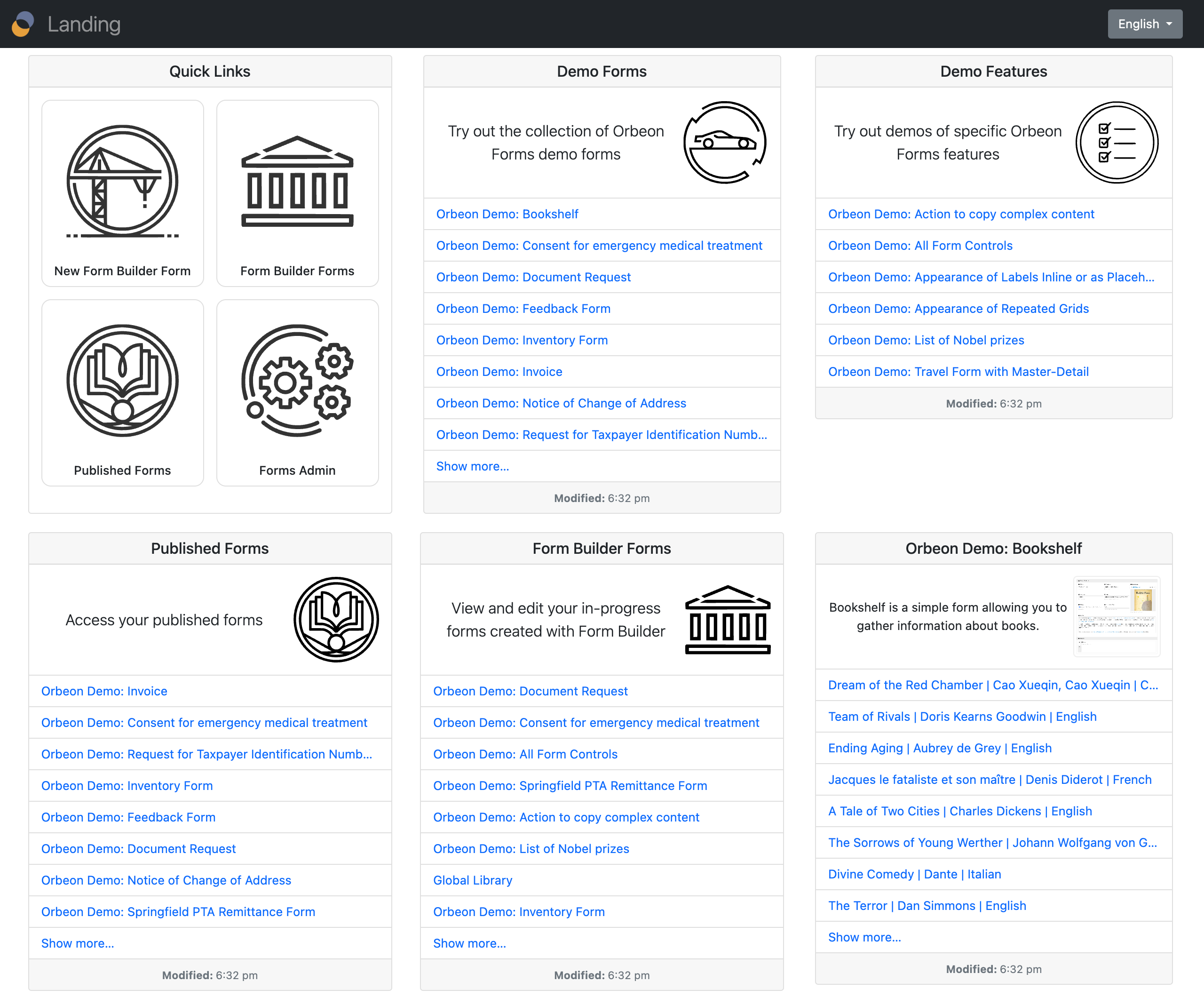
![The Landing page](/files/TL1UzBjxv0cFapOvztL3)

Some cards directly list content, including the list of published forms and the list of in-progress Form Builder forms.

You can configure whether you want to have a particular card on the Landing page. For example, you can hide the demo forms for production deployment.

All Form Runner and Form Builder navigation bars now provide a direct link to the Landing page. This can be disabled if not desired.

![Landing page navigation](/files/aXQ6g4c3zmZ3HBHfiQb8)

## Configuration properties

The following property control which cards are shown on the Landing page:

```xml
<property
    as="xs:string"
    name="oxf.fr.landing.cards"
    value="quick-links published-forms form-builder-forms demo-forms"/>
```

[\[SINCE Orbeon Forms 2024.1\]](/release-notes/orbeon-forms-2024.1.md)

You can add cards showing the latest data for specific forms. You do so by adding a token of the form `$app/$form/$version`, where:

* `$app` is the application name
* `$form` is the form name
* `$version` is the form version

For example, to show the latest data for the form `acme/sales/1`, you would use:

```xml
<property
    as="xs:string"
    name="oxf.fr.landing.cards"
    value="quick-links published-forms form-builder-forms acme/sales/1"/>
```

[\[SINCE Orbeon Forms 2024.1.1\]](/release-notes/orbeon-forms-2024.1.1.md)

The following property controls the number of rows available on cards shown on the Landing page:

```xml
<property
    as="xs:integer"
    name="oxf.fr.landing.page-size"
    value="8"/>
```

[\[SINCE Orbeon Forms 2024.1.3\]](/release-notes/orbeon-forms-2024.1.3.md)

The `oxf.fr.landing.cards` property can now be in JSON format and specify more options for cards. Here is an example:

```json
[
  {
    "card-type": "quick-links"
  },
  {
    "card-type": "published-forms",
    "title": "landing.titles.demo-forms",
    "description": "landing.descriptions.demo-forms",
    "thumbnail": "/apps/fr/style/images/orbeon/sports-car.svg",
    "app": "orbeon"
  },
  {
    "card-type": "published-forms",
    "title": "landing.titles.demo-features",
    "description": "landing.descriptions.demo-features",
    "thumbnail": "/apps/fr/style/images/orbeon/checkboxes.svg",
    "app": "orbeon-features"
  },
  {
    "card-type": "published-forms",
    "title": "landing.titles.published-forms",
    "description": "landing.descriptions.published-forms",
    "thumbnail": "/apps/fr/style/images/orbeon/book.svg"
  },
  {
    "card-type": "form-data",
    "app": "orbeon",
    "form": "builder",
    "version": 1
  } ,
  {
    "card-type": "form-data",
    "app": "orbeon",
    "form": "bookshelf",
    "version": 1
  }
]
```

The following card types are available:

* `card-type` (string, required): type of card; possible values are:
  * `quick-links`: quick links card
  * `published-forms`: published forms card
  * `form-data`: form data card

For each card type, the following options are available:

* `quick-links` card options: none
* `published-forms` card options:
  * `title` (required): title of the card
  * `description` (required): description of the card
  * `thumbnail` (required): URL of the thumbnail image for the card
  * `app` (string, optional): application name to filter forms; if not specified, all applications are shown
* `form-data` card options:
  * `app` (string, required): application name
  * `form` (string, required): form name
  * `version` (integer, required): form version

For the `form-data` cards, the title and description are taken from the form definition.

Titles and descriptions shown above use Form Runner resources. You can also specify them directly as strings, by language code:

```json
{
  "title": {
    "en": "My Title",
    "fr": "Mon Titre",
    "_": "My Title [TODO: localize]"
  },
  "description": {
    "en": "My Description",
    "fr": "Ma Description",
    "_": "My Description [TODO: localize]"
  }
}
```

The special `"_"` language code is used as a fallback when the user's language is not found.

[\[SINCE Orbeon Forms 2025.1\]](/release-notes/orbeon-forms-2025.1.md)

## See also

* [Published Forms page](/form-runner/form-runner-pages/published-forms-page.md)
* [Forms Admin page](/form-runner/form-runner-pages/forms-admin-page.md)
* [Summary page](/form-runner/form-runner-pages/summary-page.md)
  * [Summary page configuration properties](/configuration/properties/form-runner/form-runner-summary-page.md)
  * [Summary page buttons and processes](/form-runner/advanced/buttons-and-processes/summary-page-buttons-and-processes.md)
  * [Form Builder Summary page](/form-builder/summary-page.md)
* [Access control for deployed forms](/form-runner/access-control/deployed-forms.md)
* [Form Builder permissions](/form-runner/access-control/editing-forms.md#form-builder-permissions)
* [Versioning](/form-runner/features/versioning.md)
* [Control Settings dialog](/form-builder/form-editor/control-settings.md)
* Blog post: [Summary page versioning support](https://blog.orbeon.com/2019/05/summary-page-versioning-support.html)
