> For the complete documentation index, see [llms.txt](https://doc.orbeon.com/llms.txt). Markdown versions of documentation pages are available by appending `.md` to page URLs; this page is available as [Markdown](https://doc.orbeon.com/form-runner/component/us-ssn.md).
# US Social Security Number (SSN)
## Availability
[\[SINCE Orbeon Forms 2024.1.2\]](/release-notes/orbeon-forms-2024.1.2.md)
## What it does
This component represents a US Social Security Number (SSN).
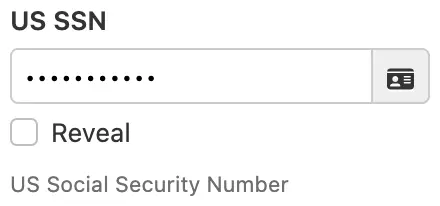
US Social Security Number (SSN) field with obscured value
It allows the user to enter a Social Security Number in the format `078-05-1120`, with or without the dashes.
* The user input is sanitized to remove any non-digit characters.
* The user input is validated:
* to ensure that it contains exactly 9 digits, otherwise the field value is considered invalid
* and to reject known invalid patterns, such as numbers starting with `000`, `666`, or `9`, or numbers that are all the same digit (e.g., `111-11-1111`)
* The value is formatted as `078-05-1120` when displaying the value.
* The value is stored in the database as a string of 9 digits including two separator dashes, for example `078-05-1120`.
*NOTE: Storing the value with dashes is a design choice which seems to match the most common usage.*
## Options
Because a Social Security Number is a sensitive piece of information, by default the value of the field is not shown entirely:
* In editable modes, the value is obscured, like a password field.
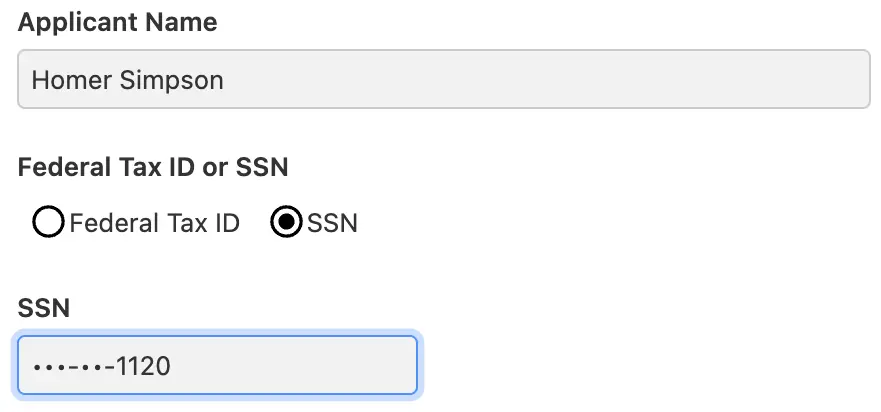
* In readonly modes, such as the View and PDF modes, only the last four digits are shown, like `•••-••-1120`.
For editable modes, you can configure the field to behave in the following ways:
| Mode | Description | Example |
| ---------------- | --------------------------------------------------------------------------------------------------------------------------------------------------------------------------- | ---------------------------- |
| Always visible | Field is always shown in plain text | `078-05-1120` |
| Always obscured | Field is always hidden | `•••••••••` |
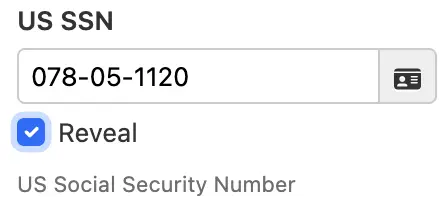
| Reveal on demand | Field is hidden by default, but can be revealed when the user clicks a "Reveal" checkbox. Useful for verifying the value while keeping it hidden from onlookers by default. | `078-05-1120` or `•••••••••` |
US Social Security Number (SSN) field with revealed value
For readonly modes, such as the View and PDF modes, you can configure the field to behave in the following ways:
| Mode | Description | Example |
| --------------------- | ------------------------------------- | ------------- |
| Visible | Field is fully shown in plain text | `078-05-1120` |
| Obscured | Field is fully hidden | `•••-••-••••` |
| Show last four digits | Only the last four digits are visible | `•••-••-1120` |
US Social Security Number (SSN) field with partially-revealed value
These options are controlled in Form Builder or using configuration properties:
* at the form control level, using the "Control Settings" dialog
* at the form level, using the "Form Settings" dialog
* in configuration properties

The default properties are as follows:
```xml
```
## Data security and GDPR
Because the SSN is a sensitive piece of information, we recommend that you handle this data in the following ways:
* First, consider not requesting this information from users unless absolutely necessary.
* Second, if you request it, consider making only transient use of it, such as calling a verification service, without storing it in your database.
* Finally, if you do store it, consider encrypting it in your database, and ensure that you comply with data protection regulations such as GDPR. Orbeon Forms [supports encryption at rest](/form-builder/advanced/field-level-encryption.md), which satisfies this requirement.
\[SINCE Orbeon Forms PE 2026.1] When you add a new US Social Security Number field to a form in Form Builder, its "Encrypt data at rest" option is enabled by default. If needed, you can disable it in the "Control Settings" dialog. This doesn't change existing fields, including SSN fields in forms created with earlier versions.
## See also
* Blog post: [Field-level encryption](https://blog.orbeon.com/2019/04/field-level-encryption.html)
* [Field-level encryption](/form-builder/advanced/field-level-encryption.md)
* [Basic Settings](/form-builder/form-editor/control-settings.md)
* [US Employer Identification Number (EIN)](/form-runner/component/us-ein.md)
* [US Phone Number](/form-runner/component/us-phone.md)
* [US State](/form-runner/component/us-state.md)